
DevLog @ 2026.03.23
Hi, this is @PurCHES5.
I've recently joined AIRI's team and will be working on AIRI's mobile development. With limited knowledge of this project and open-source workflows in general, my first task is to review the possibilities for integrating game engines or other technical solutions to improve the mobile build performance.
The current issue with AIRI's mobile integration is primarily related to performance. The latest mobile version stage-pocket, is essentially a direct copy of the main Vue.js application packaged using Capacitor.
On mobile devices—especially iOS devices and lower-end hardware, the Live2D and VRM components quickly consume the available memory allocated to the WebView, which results in crashes.
Problem Analysis
Observed Behavior
- High memory usage when rendering Live2D / VRM models
- Frequent crashes on iOS and low-end Android devices
- Performance degradation after extended runtime
Suspected Causes
- WebView memory leaks
- Weak Three.js performance on mobile processors
Current Architecture Overview
Mobile Build Stack
| Layer | Technology |
|---|---|
| Frontend | Vue.js |
| Packaging | Capacitor |
| Rendering | WebGL (Three.js) |
| Runtime | Mobile WebView |
Rendering Flow
Vue UI
  ↓
WebView
  ↓
Three.js / Live2D / VRM
  ↓
Capacitor
  ↓
GPU
Performance Constraints on Mobile
WebView Limitations
- Memory allocation is significantly lower than native apps
- Garbage collection behavior is less predictable
- GPU memory pressure can terminate the process
Device-Specific Constraints
- iOS WebView memory ceiling
- Lower-end Android devices with limited RAM
Game Engine Integration Exploration
Candidate Engines
2D
- PixiJS
- Cocos Creator
- Unity
- Godot
- Bevy
- Unreal Engine
3D
- Three.js
- Babylon.js
- Unity
- Godot
- Unreal Engine
- Custom / hand-written 3D engine
Integration Strategies
| Strategy | Description |
|---|---|
| Full Engine Replacement | Replace the WebView renderer entirely with a native engine |
| Hybrid WebView | Engine handles rendering; WebView handles UI |
| Native Rendering Module | Engine runs as a background layer; Vue.js UI overlays it |
Required Features
- Live2D
- MMD
- VRM
- Spine2D
Unity Integration Proposal
Rendering Responsibility Split
Unity handles:
- VRM rendering
- Live2D rendering
- Animation
- Physics (if needed)
Vue / WebView handles:
- UI
- Settings
- Network requests
Proposed Hybrid Architecture
Vue UI
  ↓
Native Bridge
  ↓
Unity Runtime
  ↓
Capacitor
  ↓
GPU
Prototype Builds
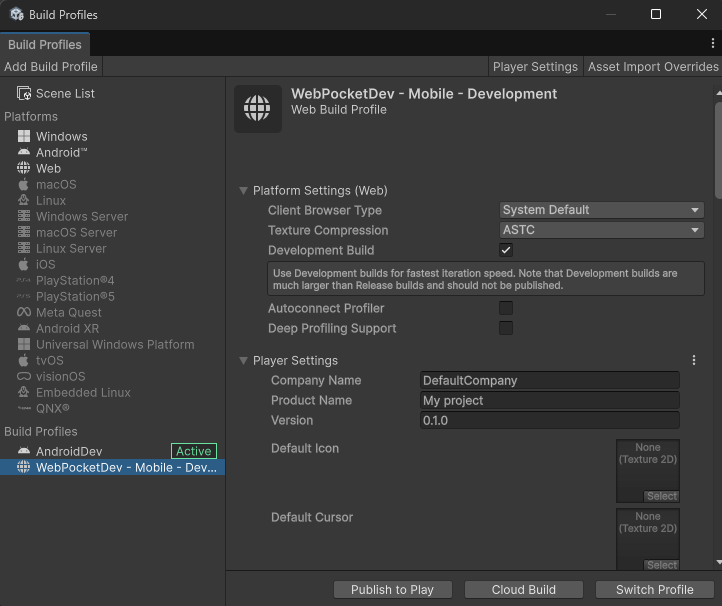
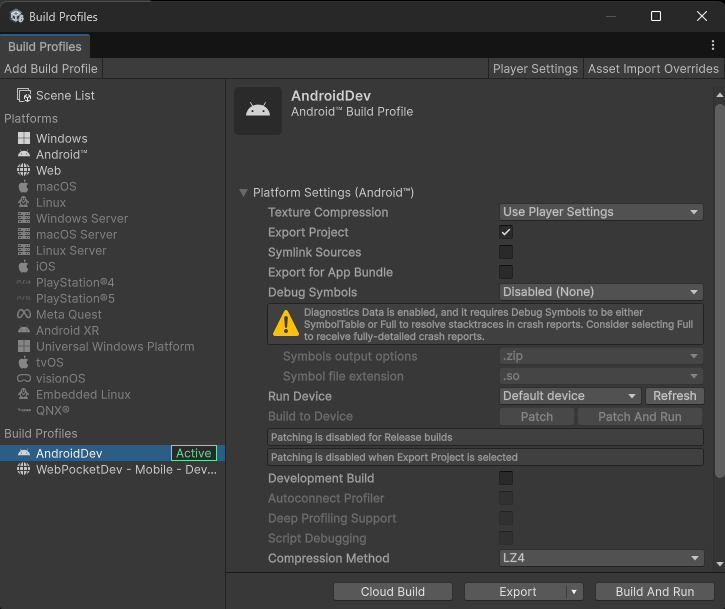
Three prototype configurations were built using Unity 3D, with compression applied to reduce export size.
Unity WebGL Export Settings
Unity Android Renderer Settings
Screenshots
Android Renderer — Live2D:
Android Renderer — VRM:
The same Vue.js front-end is consistently applied to all prototype builds to ensure consistency. For Unity WebGL export, the original contents in WebView are directly substituted with Unity WebGL using unity-webgl. For Unity Android Renderer, the original view containing Three.js and VRM modules is removed entirely, and Unity renders as a background layer while the Vue.js UI is rendered over it.
Benchmark Results
All measurements were taken on a Samsung A34 under equivalent conditions. A lower-end device was chosen deliberately to highlight performance differences more clearly.
Live2D Rendering
| Metric | Three.js (Baseline) | Unity WebGL | Unity Android Renderer |
|---|---|---|---|
| Total RAM | 354 MB | 360 MB | 663 MB |
| Graphics Memory | 210 MB | 202 MB | 309 MB |
| CPU Usage | 18% | 19% | 7% |
| FPS | Decent | Decent | Smooth |
VRM Rendering
| Metric | Original VRM (Baseline) | Unity WebGL | Unity Android Renderer |
|---|---|---|---|
| Total RAM | 724 MB | 402 MB | 651 MB |
| Graphics Memory | 566 MB | 247 MB | 292 MB |
| CPU Usage | 11% | 18% | 5% |
| FPS | Low | Decent | Smooth |
Reference Screenshots
Three.js — Live2D (baseline):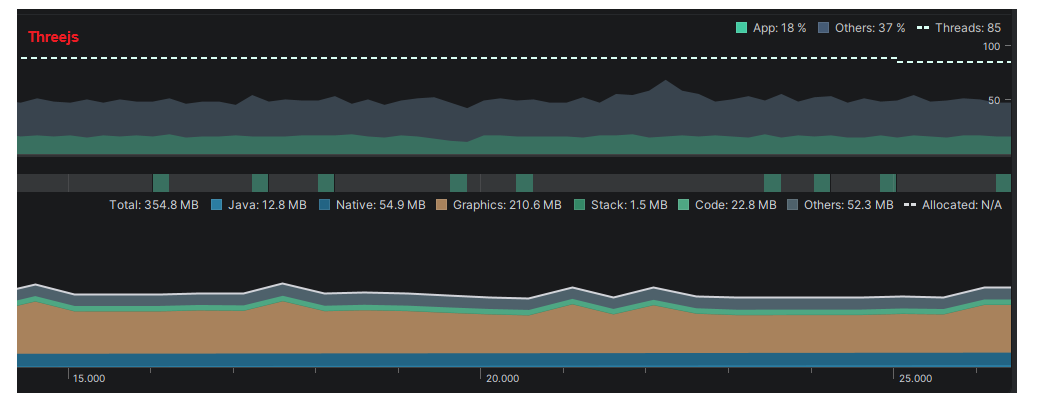
Unity WebGL — Live2D: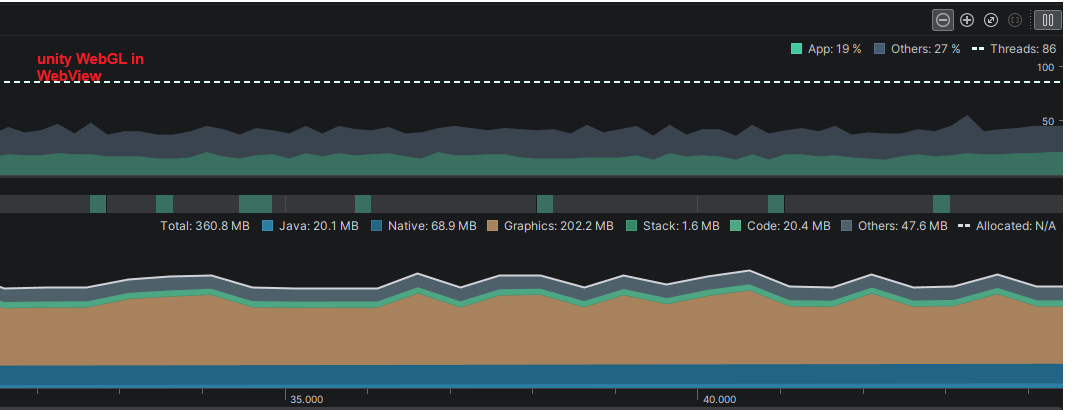
Unity Android Renderer — Live2D: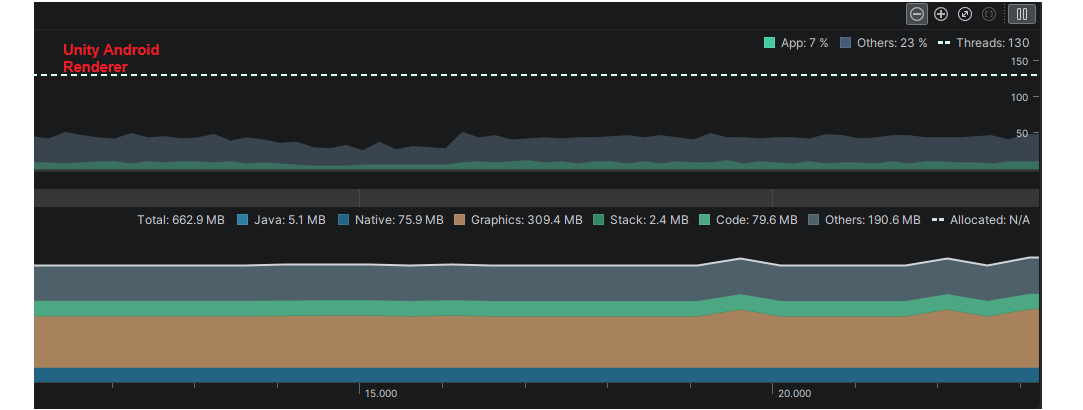
Three.js — VRM (baseline):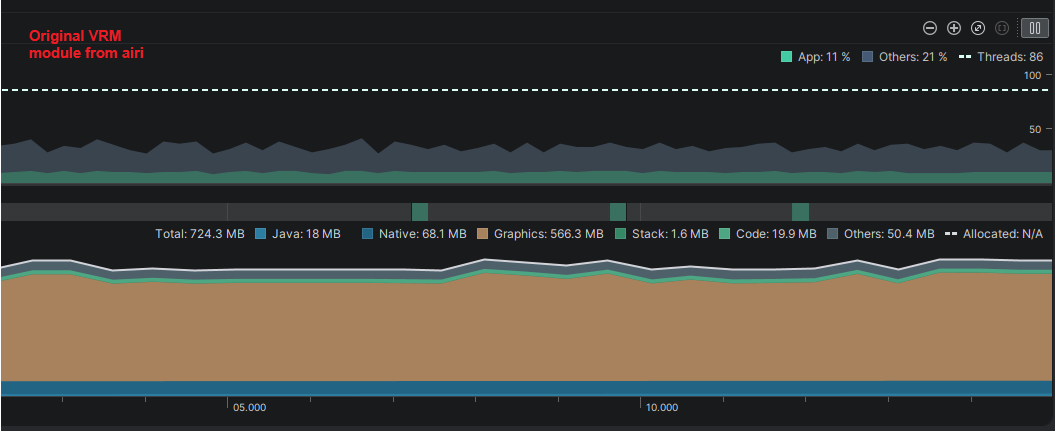
Unity WebGL — VRM: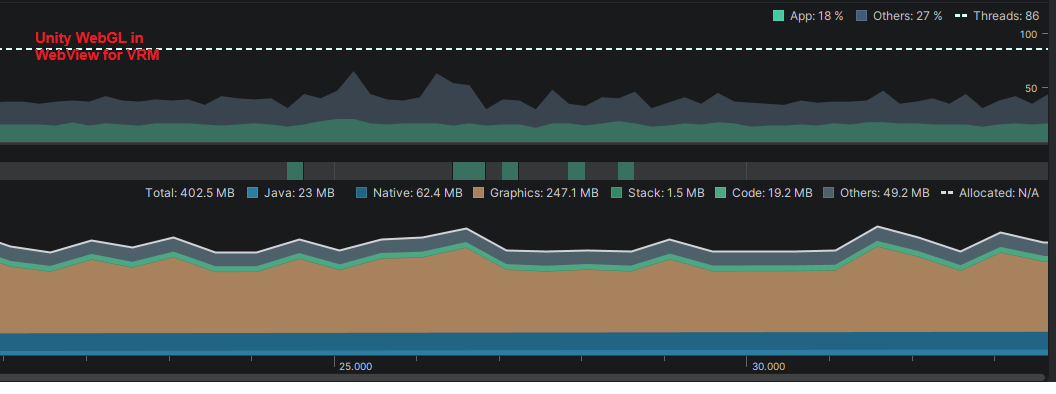
Unity Android Renderer — VRM: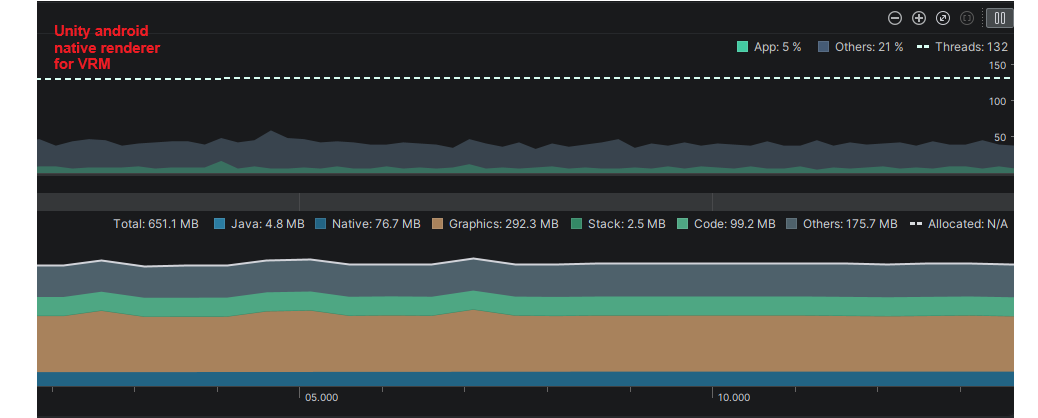
Key Observations
- VRM is the critical bottleneck. The baseline Three.js VRM renderer uses 724 MB total RAM and 566 MB graphics memory — far exceeding what most mobile WebViews can sustain without crashing. Unity WebGL brings this down to 402 MB / 247 MB, and the Android Renderer to 651 MB / 292 MB.
- Unity WebGL offers the best memory profile for VRM with minimal architectural change, at the cost of slightly higher CPU usage.
- Unity Android Renderer delivers the best frame rate and CPU efficiency, at the cost of higher total RAM usage — this is expected as the Unity runtime itself carries overhead, but the GPU work is offloaded from the WebView.
- Live2D performance is comparable across all three approaches. The baseline Three.js implementation is adequate on most Android devices, but the main gain from switching is headroom for future content and stability on low-end devices.
Risk Assessment
| Risk | Notes |
|---|---|
| Increased app / export size | Unity runtime adds significant binary weight |
| Contributor requirements | Requires Unity / C# and shader expertise |
| Cross-platform maintenance | Android and iOS Unity builds must be maintained in parallel |
| Bridge complexity | Two-way communication between Vue and Unity needs a stable API |
Evaluation Criteria
For future prototypes and any engine decision, the following metrics should be measured consistently:
- Memory usage (RAM and GPU)
- FPS stability under sustained load
- Startup / cold-launch time
- Build / install size
- Battery consumption
- Development complexity
- Long-term maintainability
Next Steps
1. Evaluate Bridge Complexity
Investigate Unity as a Library integration or similar plugins to facilitate two-way communication (e.g., sending chat-triggered expressions from Vue to Unity).
2. iOS-Specific Prototyping
Since iOS is the most restrictive environment regarding WebView memory, the next prototype must be validated on an iPhone to ensure the Unity Native layer bypasses the "Total Safari Memory" limit.
3. Build Size Optimization
Explore Unity’s asset management system, keeping the initial install size minimal.
4. Community / Contributor Outreach
Define the skill set required for future contributors (Unity/C#, Shader coding) to ensure the project remains maintainable.